| Français | ← Table of Contents |
2. Main Window & Live Views (LiveView)
Overall Layout
The Open Lighting Console main window pairs two resizable panes separated by a central vertical divider (Gtk.Paned), topped by a header bar and anchored at the bottom by the full-width command line:
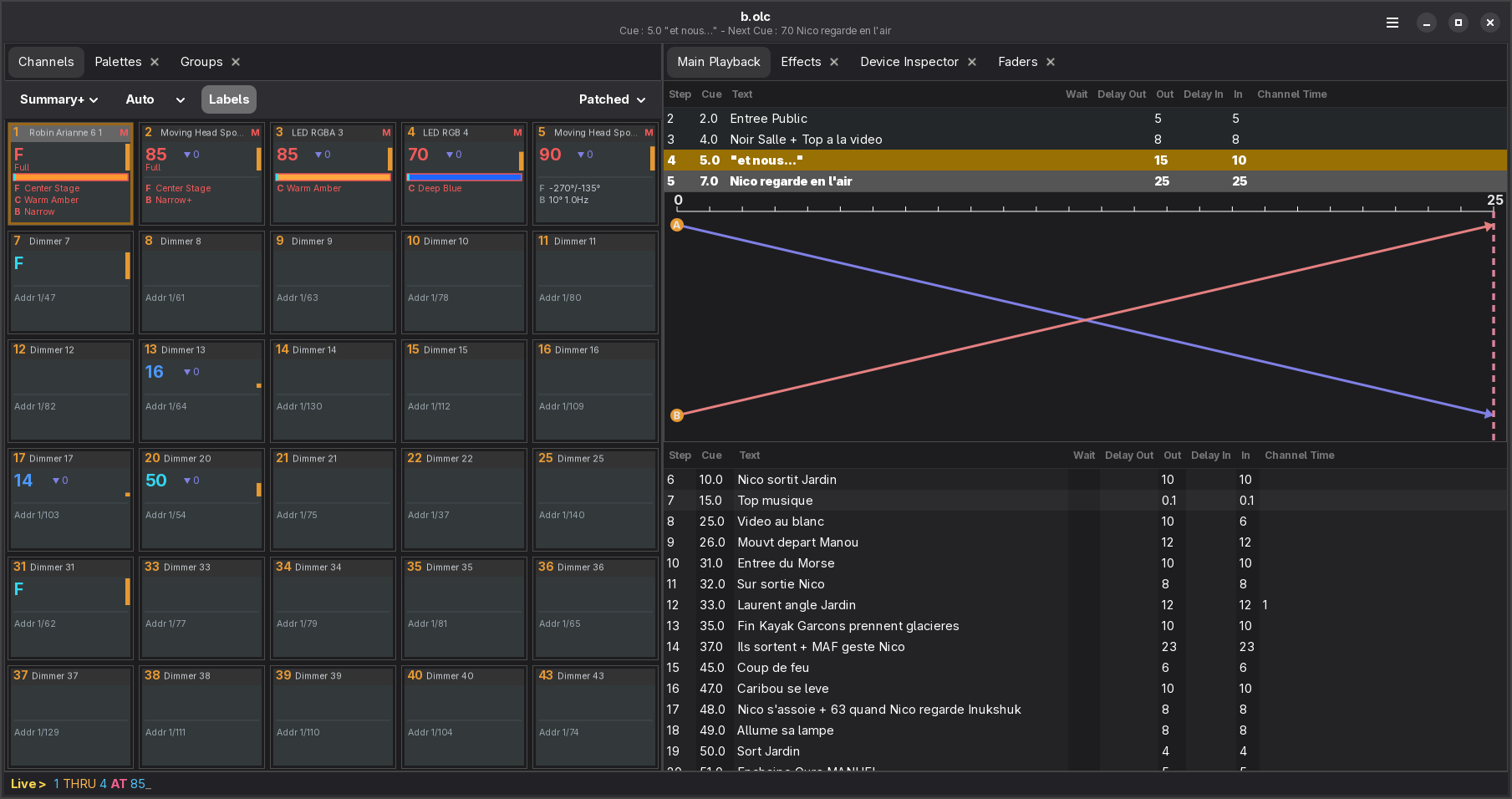
- Header Bar: shows the active show filename (e.g.
b.olc), live subtitle (Cue : 5.0 "..." - Next Cue : 7.0 ...), the application menu button, and window controls. - Left Pane (
LiveView): hosts theChannelstab and any editor tab moved to the left pane. - Right Pane (
Playback): hostsMain Playback— previous cue list on top, A/B Crossfade graph in the center, upcoming cue list below — along with additional editor tabs. - Command Line (bottom): shows the active prompt (
Live >), syntax-highlighted command tokens, and inline auto-completion suggestions.
Tab Management
All tabs opened from the application menu (Patch, Fixtures, DMX Outputs, Curves, Cues, Groups, Palettes, Effects, Sequences, Faders, Track Channels, Independents, Device Inspector, History, Preferences) share flexible placement:
Shift+Tab: moves the active tab between the left pane and the right pane so you can view any two editors side by side (e.g.Channelsnext toEffectsorDevice Inspector, orPalettesbesideMain Playback).Ctrl+W: closes the active tab (except permanentChannelsandMain Playback).- Open tabs, pane assignments, and divider position persist inside
.olcshow files.
LiveView Display Controls
The toolbar above the Channels grid controls visual density and filtering:
1. Display Format (Shift+Alt+F)
- Compact: high-density grid tiles showing channel number, intensity value, level bar,
F/C/Bdots, and color swatch. - Summary+: expanded tiles displaying fixture labels, full color bar, and readable text summaries (referenced
IP/FP/CP/BPpalette labels or physical Pan/Tilt/Zoom/Strobe values). - Table: structured row-by-row table with collapsible parameter family columns (
FFocus,CColor,BBeam), dynamic per-parameter columns matching patched fixtures, and live color swatches.
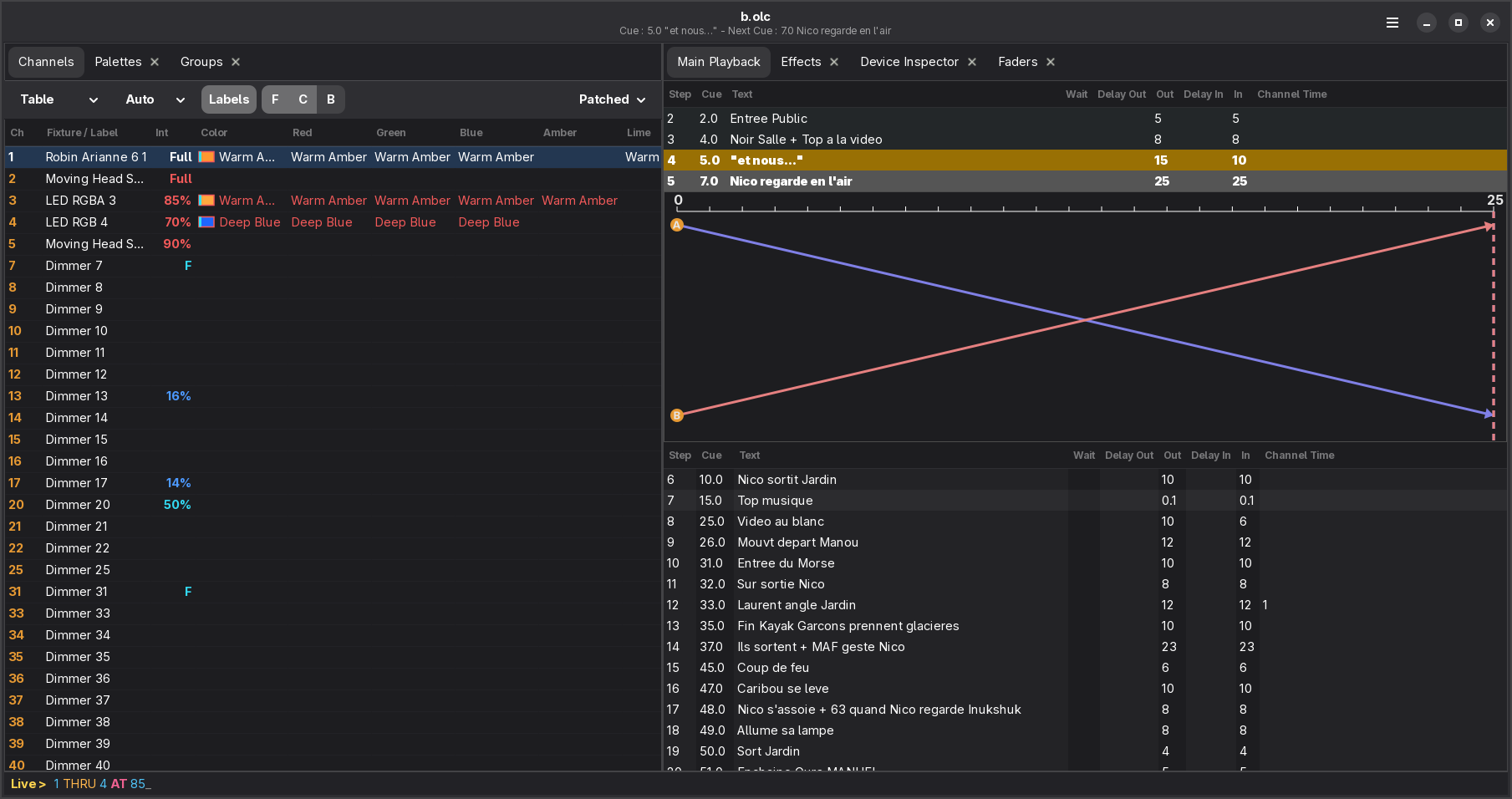
2. Readout Mode (Shift+Alt+D)
Switches how parameter data is rendered across tiles and table cells:
- Auto: displays referenced palette/preset labels when linked, otherwise formatted physical values.
- Label: displays fixture/palette labels.
- Ref: displays short reference codes (
IP1,FP1,CP1,BP1,PR1). - Percent: forces percentage readouts (
0..100/F). - DMX: forces raw DMX readouts (
0..255/0..65535).
3. Labels & Flexi Filters
Labelsbutton (Shift+Alt+L): toggles custom fixture/channel labels on or off.- Flexi Filter (
Ctrl+F): cycles through channel visibility presets:- All: every channel up to
MAX_CHANNELS. - Patched: patched channels only.
- Active: channels currently above zero or transitioning.
- Devices: multi-parameter intelligent fixtures only.
- Selected: currently selected channels only.
- Manual: channels holding manual operator edits only.
- All: every channel up to
General & Navigation Keyboard Shortcuts
| Shortcut | Action |
|---|---|
Ctrl+O / Ctrl+S / Shift+Ctrl+S |
Open / Save / Save As |
Shift+Ctrl+O |
Import USITT ASCII show |
Ctrl+Z / Shift+Ctrl+Z (Ctrl+Y) |
Undo / Redo |
Ctrl+W / Shift+Tab |
Close active tab / Move active tab to opposite pane |
F11 / F3 / Ctrl+Q |
Fullscreen / About / Quit |
Ctrl+F |
Cycle Flexi filter (All, Patched, Active, Devices, Selected, Manual) |
Shift+Alt+F / Shift+Alt+D / Shift+Alt+L |
Cycle Format (Compact/Summary+/Table) / Readout Mode / Labels |
Shift+Ctrl+B |
Global Blackout (DBO) |
Ctrl+A / Ctrl+Up / Ctrl+Down |
Select all active channels / Level + % / - % |
Space or Ctrl+G / Ctrl+B / Ctrl+Space |
Go / GoBack / Pause on Main Playback |
Alt+Down / Alt+Up |
Next / Previous Step, Cue, Group, or Palette |
Shift+Up / Shift+Down |
Previous / Next command line history entry |
Arrows, PageUp, PageDown |
Navigate channel grid |
F2 / Insert / Delete |
Rename / Insert Cue or Channel Time / Delete selected item |
Direct Tab Shortcuts
| Shortcut | Tab |
|---|---|
Ctrl+P / Shift+Ctrl+P / Ctrl+D |
Patch / Fixtures / DMX Outputs |
Shift+Ctrl+G / Shift+Ctrl+L / Shift+Ctrl+E |
Groups / Palettes / Effects |
Ctrl+T / Shift+Ctrl+T |
Sequences / Track Channels |
Ctrl+F (Flexi) / Shift+Ctrl+F / Ctrl+I |
Flexi Filter / Faders / Independents |
Shift+Ctrl+I / Shift+Ctrl+C / Shift+Ctrl+H |
Device Inspector / Virtual Console / Undo History |
Previous: 1. Introduction — Next: 3. Command Line (CLI) →