| Français | ← Table of Contents |
17. Virtual Console
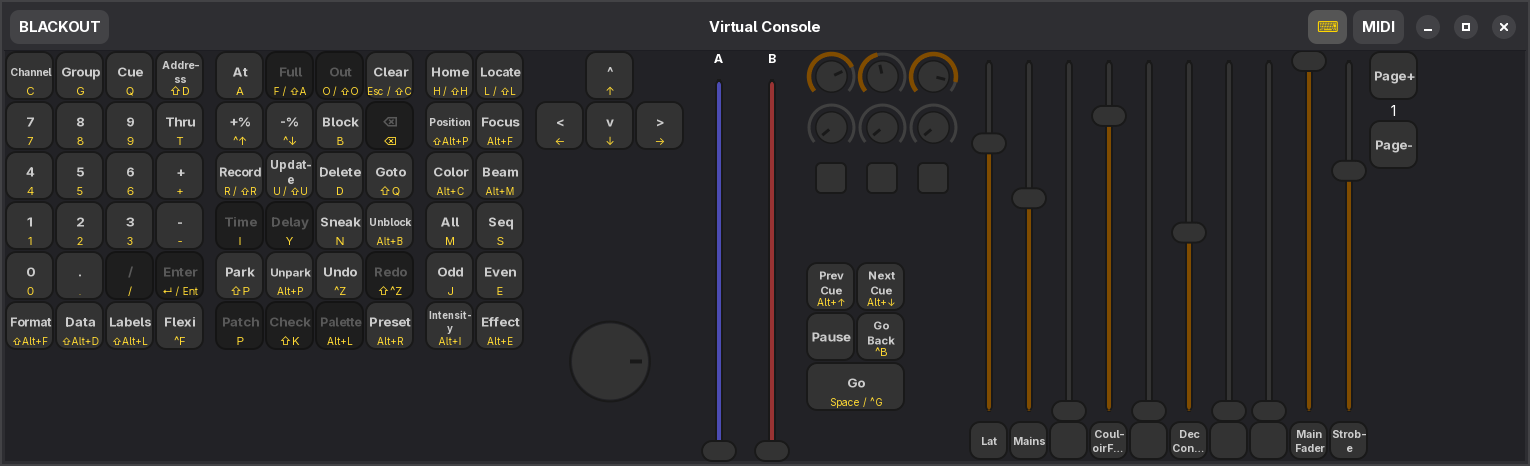
The Virtual Console (Shift+Ctrl+C) provides a hardware-style control surface window synchronized live with console state, fader banks, OSC, and MIDI:
Title Bar
BLACKOUT: kills all DMX outputs immediately (equivalent toShift+Ctrl+B).- Keyboard icon (amber when active): pins the keyboard shortcut labels directly on every Virtual Console key (also shown temporarily while holding
F1). MIDI: toggles interactive MIDI Learn mode. Click any virtual fader, Flash button, knob, or action button, then move the corresponding hardware control on your MIDI surface to bind it.
Sections
- Numeric & Eos Action Keypad (left):
Channel,Group,Cue,Address,0..9,Thru,+,-,/,Enter, quick LiveView controls (Format,Data,Labels,Flexi), and full CLI actions (At,Full,Out,Clear,+%,-%,Block,Record,Update,Delete,Goto,Time,Delay,Sneak,Unblock,Park,Unpark,Undo,Redo,Patch,Check,Palette,Preset,Home,Locate,Position,Focus,Color,Beam,All,Seq,Odd,Even,Intensity,Effect). - Navigation & Manual Playback (center):
- Directional cross (
^,<,v,>) + rotary level wheel. - Dual manual
A/Bcrossfaders (blue fade-in, red fade-out). - Main playback controls:
Prev Cue,Next Cue,Pause,Go Back, andGo.
- Directional cross (
- Independents & Multi-Page Fader Bank (right):
- 6 Independent controls (3 amber-ring rotary encoders + 3 buttons).
- 10 faders with Flash buttons, live assigned labels underneath (
Lat,Mains,Main Fader,Strobe, …), andPage+/Page-buttons around the active page readout.
Previous: 16. Independents — Next: 18. Undo History →