| Français | ← Table of Contents |
6. Fixture Library & GDTF (Fixtures)
The Fixtures tab (Shift+Ctrl+P) hosts the built-in catalog, user fixture definitions, and DIN SPEC 15800 (.gdtf) importer:
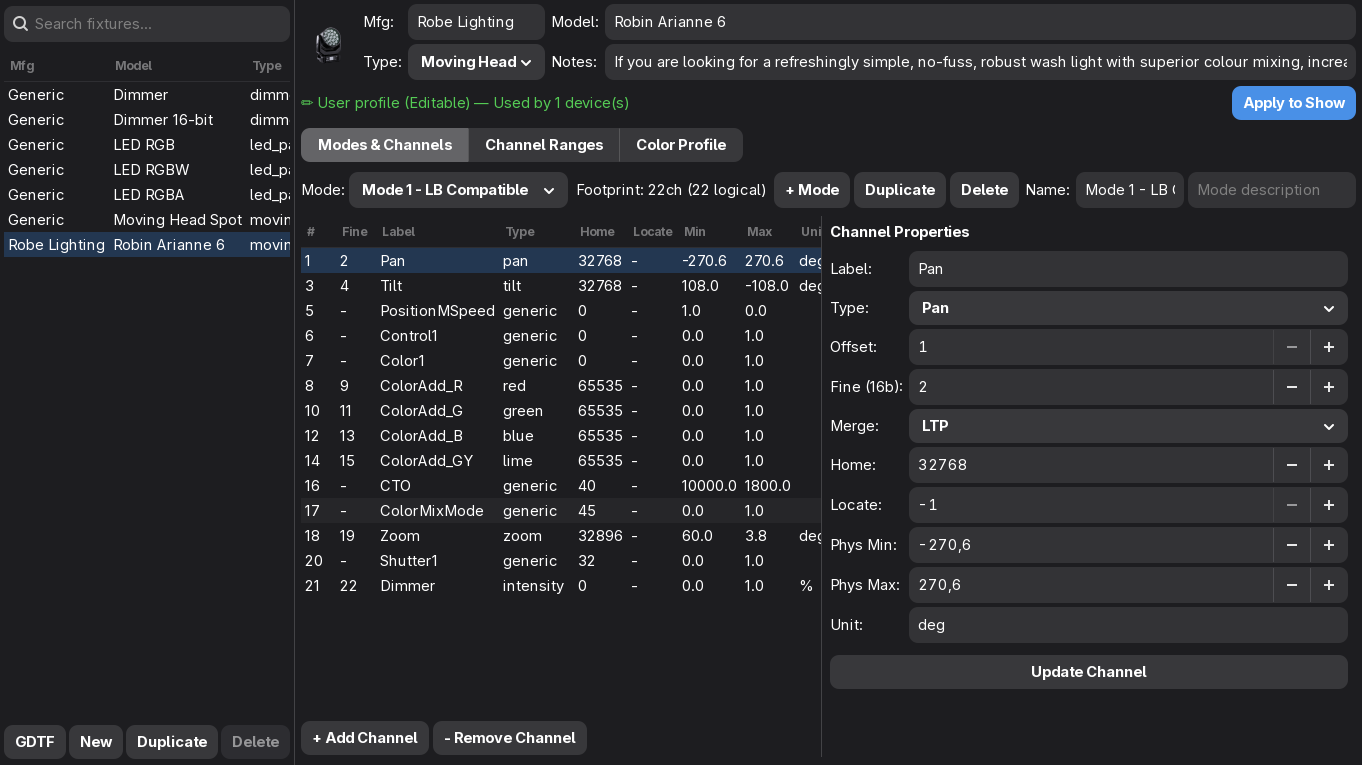
Left Catalog
- Search bar (
Search fixtures...): live-filters by manufacturer (Mfg), model (Model), or fixture type (Type). - Columns:
Mfg,Model,Type,Used(count of devices currently patched in the show). - Library actions:
GDTF: imports a.gdtfmanufacturer archive (DIN SPEC 15800) viapygdtf(8/16-bit channels, multiple modes, channel ranges, and color primaries).New: creates a blank editable user fixture profile.Duplicate: clones any built-in fixture definition so you can customize it.Delete: removes a user fixture definition.
Right Profile Editor
Any user-editable profile (User profile (Editable)) can be modified live:
- Metadata:
Mfg,Model,Type(Moving Head,dimmer,led_par, …),Notes. Apply to Show: pushes profile changes immediately to matching patched devices in the current show without repatching.Modes & Channelssub-tab:- Manage DMX modes (
Mode,+ Mode,Duplicate,Delete,Name,Mode description) with liveFootprintcalculation. - Edit channels table (
#,Fine,Label,Type,Home,Locate,Min,Max,Unit) with+ Add Channeland- Remove Channel. Channel Propertiespanel: editLabel,Type,Offset,Fine (16b),Merge(LTP/HTP),Home,Locate,Phys Min,Phys Max,Unit, and apply withUpdate Channel.
- Manage DMX modes (
Channel Rangessub-tab: defines discrete functional ranges (gobo wheels, color wheels, shutter/control ranges) shown inDevice Inspector.Color Profilesub-tab: configures emitter spectral/CIE primaries and white points for the N-LED colorimetry solver.
Previous: 5. Patch & DMX Outputs — Next: 7. Device Inspector →