| Français | ← Table of Contents |
8. Palettes & Presets
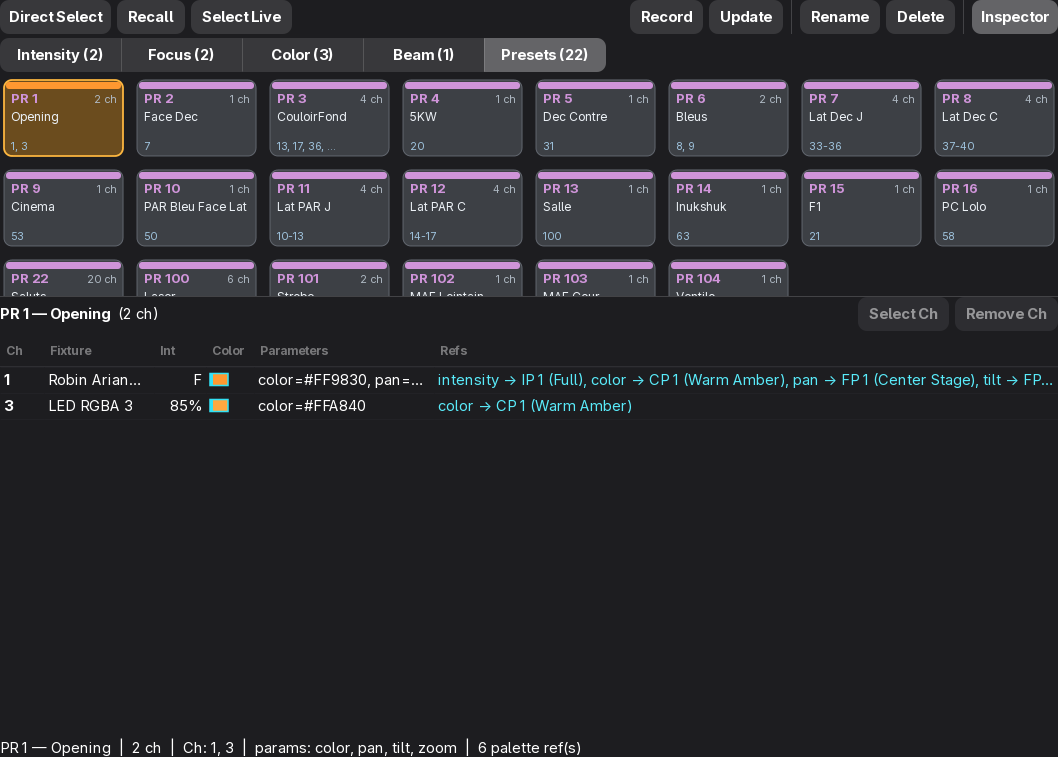
The Palettes tab (Shift+Ctrl+L) organizes reusable attribute building blocks by IFCB family as well as multi-family Presets:
Categories & Prefixes
Top category tabs filter stored entries with live counts:
Intensity(IP): intensity palettes.Focus(FP): position palettes (Pan,Tilt).Color(CP): color palettes (#FF9830, hues, emitter levels).Beam(BP): optics/beam palettes (Zoom,Focus,Iris,Strobe,Frost,Gobo,Prism).Presets(PR): combined multi-family presets capable of cascading references to palettes (IP,FP,CP,BP) as shown above (color -> CP1 (Warm Amber)).
Recall Behavior & Controls
Top Toolbar
Direct Select: enables touch-style direct action — clicking any tile recalls the palette or preset immediately.Recall: applies the selected palette or preset.- If channels are selected in Live, values apply only to the active selection.
- If nothing is selected in Live, the palette or preset applies to all channels stored inside it.
- LiveView feedback: recalled live values turn red (manual) to indicate operator-controlled values until updated into a cue or released via
Sneak.
Select Live: selects all channels stored in the chosen palette/preset insideLiveView.Record,Update,Rename,Delete: capture live edits, propagate updates across dependent cues/presets, rename (F2), or delete items.Inspector: toggles the collapsible lower inspection panel.
Inspector Panel & Summary Footer
With Inspector enabled, the bottom pane shows:
- Item heading (e.g.
PR 1 — Opening (2 ch)). - Local buttons:
Select Ch(selects highlighted channels in LiveView) andRemove Ch(removes selected channel(s) from the palette/preset). - Detailed channel table:
Ch,Fixture,Int,Colorswatch,Parameters(stored raw/physical values), andRefs(cascade reference chainparam -> IP/FP/CP/BP). - Status footer: one-line summary of ID, name, channel count, channel list, parameter families, and palette reference count.
Equivalent CLI Commands
- Recall:
IP 1,CP 2,PR 1or1 THRU 4 CP 1 - Record / Update / Delete:
RECORD CP 3,UPDATE PR 1,DELETE FP 2
Previous: 7. Device Inspector — Next: 9. Groups →