| Français | ← Table of Contents |
9. Groups
The Groups tab (Shift+Ctrl+G) stores ordered channel selections (without intensity levels) to speed up programming, live selection, fanning, and effect distribution:
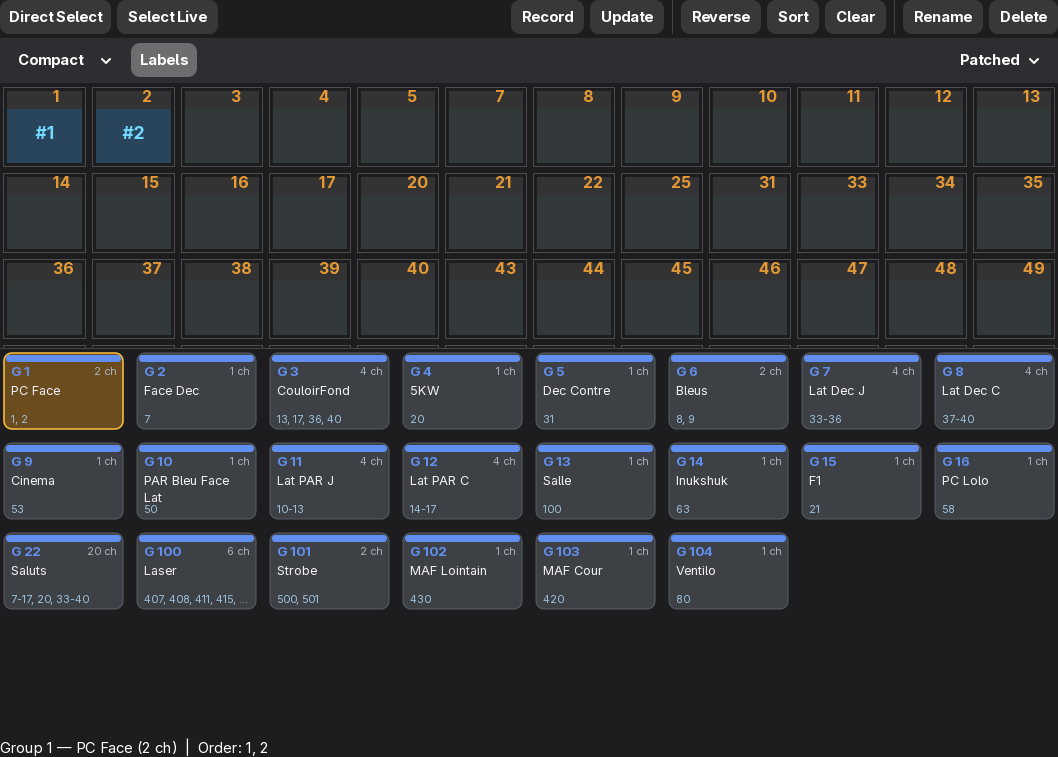
Visual Grid & Selection Order Badges
- The top pane embeds a
ChannelsViewgrid with view controls (Compact/Summary+,Labels, FlexiPatched, …). - Order badges (
#1,#2, …): channels belonging to the selected group show numbered badges reflecting exact selection order (essential for chases, color fans, and effect phase distribution). - The bottom pane displays group tiles (
G 1 — PC Face — 2 ch — 1, 2) plus a summary line showing the active group name, channel count, and exact ordered sequence (Order: 1, 2).
Toolbar Actions
Direct Select: clicking a group tile immediately selects its channels inLiveViewin order.Select Live: pushes the currently selected group’s channel list intoLiveView.Record/Update: creates a new group from the current selection or overwrites the selected group.Reverse: reverses channel order (1, 2, 3, 4->4, 3, 2, 1).Sort: sorts or reorders channels numerically / according to current order.Clear: clears the active channel selection in the editor.Rename(F2) /Delete(Delete): renames or deletes the selected group.
Equivalent CLI Commands
- Recall selection:
GROUP 1orG 1 THRU 3 - Record / Label:
RECORD GROUP 10 LABEL "Front" - Update / Rename / Delete:
UPDATE GROUP 10,LABEL GROUP 10 "Back",DELETE GROUP 10
Previous: 8. Palettes & Presets — Next: 10. Parametric Effects →