| Français | ← Table of Contents |
10. Parametric Effects (Effects)
Open Lighting Console replaces legacy static chasers with a real-time 44 Hz floating-point parametric effects engine (Shift+Ctrl+E or Alt+E):
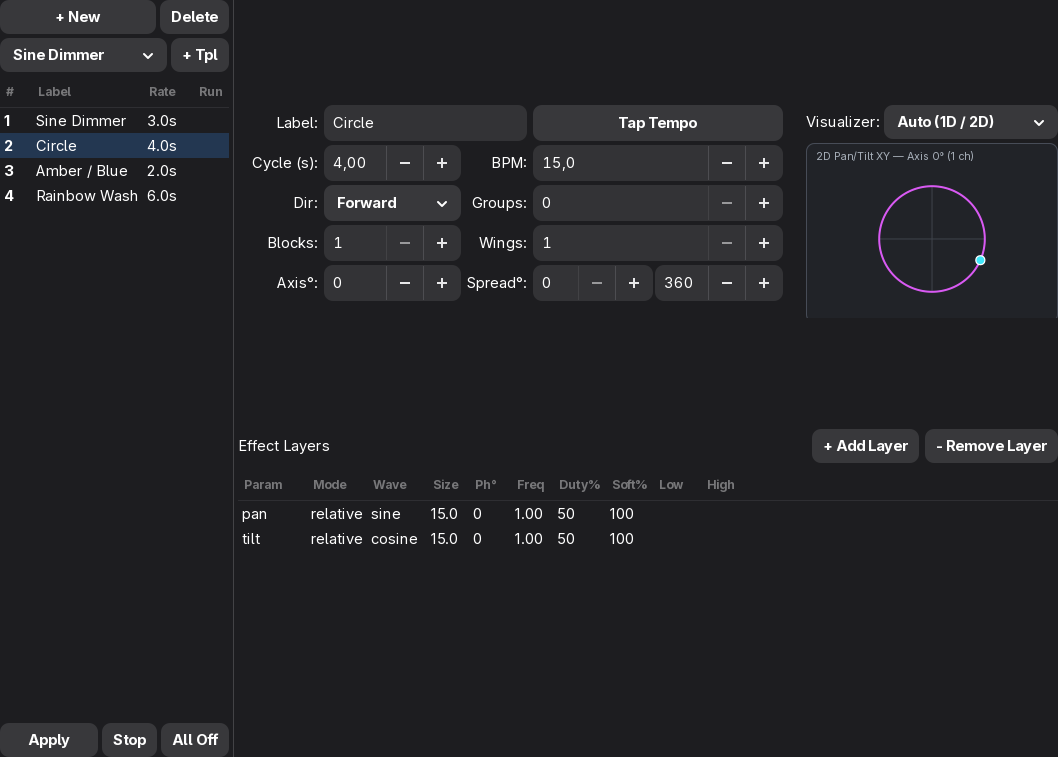
Pool & Built-In Templates (+ Tpl)
The left pool lists show effects (#, Label, Rate, Run). Use + New to create an empty effect, Delete to remove it, or + Tpl to instantiate one of the 10 built-in templates:
| Template ID | Effect Description |
|---|---|
sine_dimmer |
Smooth sine wave dimmer modulation |
chase_cancan |
Step-based intensity chase |
candle_flicker |
Organic candle-like intensity flicker |
circle |
2D circular Pan / Tilt trajectory (sine + cosine) |
figure_8 |
Figure-8 (1:2 Lissajous) Pan / Tilt path |
tilt_wave |
Vertical wave on Tilt |
fly_in_out |
Synchronized intensity + Tilt sweep |
two_color_chase |
Two-color alternating chase |
rainbow |
Continuous hue/RGB spectrum rotation |
zoom_pulse |
Periodic Zoom pulsing |
Bottom controls (Apply, Stop, All Off) run the selected effect on the active selection, stop it, or halt all running effects.
Timing & Spatial Distribution
Label: effect name.Tap Tempo: matches cycle BPM to your clicking tempo.Cycle (s)&BPM: cycle period in seconds or beats per minute (linked dynamically).Dir: traversal direction (Forward, …).Groups,Blocks,Wings: distribute phases across adjacent sub-groups, synchronous blocks, or mirrored wings.Axis°&Spread°: 2D rotation axis angle and phase spread window across fixtures (e.g.0°to360°).
Live Visualizer & Effect Layers
Visualizer: switches betweenAuto (1D / 2D)(draws a 2D Pan/Tilt XY Cairo plot as shown above, or waveforms when non-XY) and1D Waveform(time-domain plots per layer).Effect Layerstable (+ Add Layer,- Remove Layer): stack one or more editable parameter layers:Param(intensity,pan,tilt,color,zoom, …)Mode(relative,absolute, …)Wave(sine,cosine,triangle,square, …)Size,Ph°(phase offset),Freq(frequency multiplier),Duty%,Soft%,Low,High.
Cue Tracking, Faders & CLI
- CLI:
<selection> EFFECT 2starts effect2;STOP EFFECT 2orSTOPstops it. - Sequences & Tracking: effect start/stop events record into cues and track downstream in Tracking mode (
FXcolumn inSequences). - Faders: assigning an
Effectto a fader lets you controlMode: Size,Mode: Rate, orMode: Size+Ratelive.
Previous: 9. Groups — Next: 11. Cues →