| Français | ← Table of Contents |
11. Cues
The Cues tab provides direct access to every stored lighting cue and its captured channels:
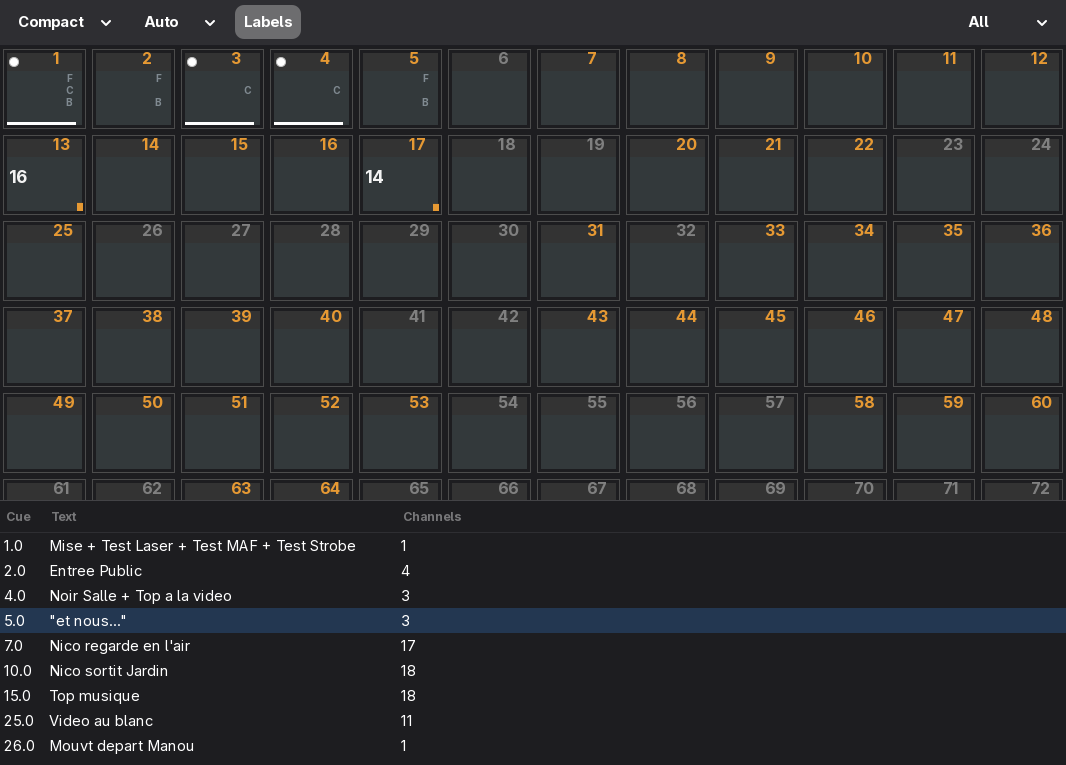
Layout
- Top Pane (
ChannelsView): renders channel states for the cue selected below using standard view controls (Compact/Summary+/Table,Auto / Label / Ref / Percent / DMX,Labels, and Flexi filters).- Intelligent fixtures display
F,C,Bactivity dots, live color bars, and cue state indicators.
- Intelligent fixtures display
- Bottom Pane: lists cues with
Cuenumber,Textdescription, andChannelscount.
Creating, Updating & Deleting Cues
- From the Command Line:
RECORD 12orRECORD CUE 12 TIME 6: stores current output as cue12.UPDATE 12orUPDATE: updates cue12or the currently active cue.DELETE 12: deletes cue12.GOTO 12orGOTO CUE 12 TIME 2: executes a direct jump to cue12.
- Direct Editing: select any row in the cue list to inspect, label, or adjust stored channel levels directly.
Previous: 10. Parametric Effects — Next: 12. Sequences, Tracking & MIB →