| Français | ← Table of Contents |
12. Sequences, Tracking & MIB (Sequences)
The Sequences tab (Ctrl+T) edits 1 Main Playback as well as auxiliary sequences assignable to faders:
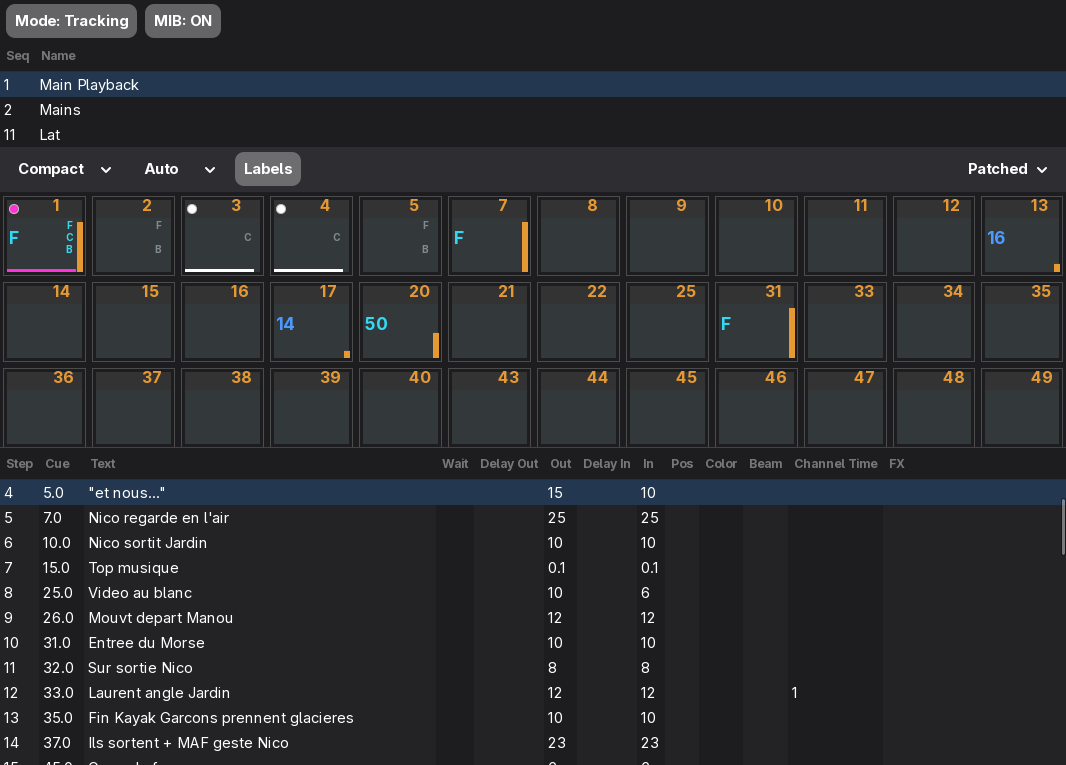
Playback Modes (Tracking & MIB)
Two toggle buttons at the top configure the active sequence:
Mode: Tracking/Mode: Cue-Only:- Tracking preserves channel values and running effects downstream across subsequent cues until explicitly changed, blocked (
Block), or brought to zero. - Cue-Only isolates edits strictly to the edited cue without propagating downstream.
- Tracking preserves channel values and running effects downstream across subsequent cues until explicitly changed, blocked (
MIB: ON/MIB: OFF(Move In Black):- Look-ahead automation pre-positions intelligent fixture parameters (Pan/Tilt, Color, Beam) while intensity is at 0 % ahead of their next active cue, preventing visible transitions during fade-in.
Layout
- Sequence list (top):
SeqandName(1 Main Playback,2,11, …). ChannelsViewgrid (middle): previews and allows direct editing of channels in the selected step.- Steps / Cues table (bottom): lists every step in the sequence.
Step Table Columns
| Column | Meaning |
|---|---|
Step / Cue / Text |
Step index, cue number (supports decimals), and description |
Wait |
Automatic follow/wait delay (if configured) |
Delay Out / Out |
Fade-out delay and duration |
Delay In / In |
Fade-in delay and duration |
Pos / Color / Beam |
Per-family IFCB transition times (inherits general time when empty) |
Channel Time |
Count of per-channel timing overrides; double-click to open the per-channel timing editor |
FX |
Effect state: amber (FX <n> started here), cyan (FX <n> (T) tracked downstream), red (Stop FX) |
Previous: 11. Cues — Next: 13. Multi-Page Faders →