| Français | ← Table of Contents |
13. Multi-Page Faders (Faders)
The Faders tab (Shift+Ctrl+F) configures banks of 10 faders per page, mirrored across Virtual Console, MIDI, and OSC:
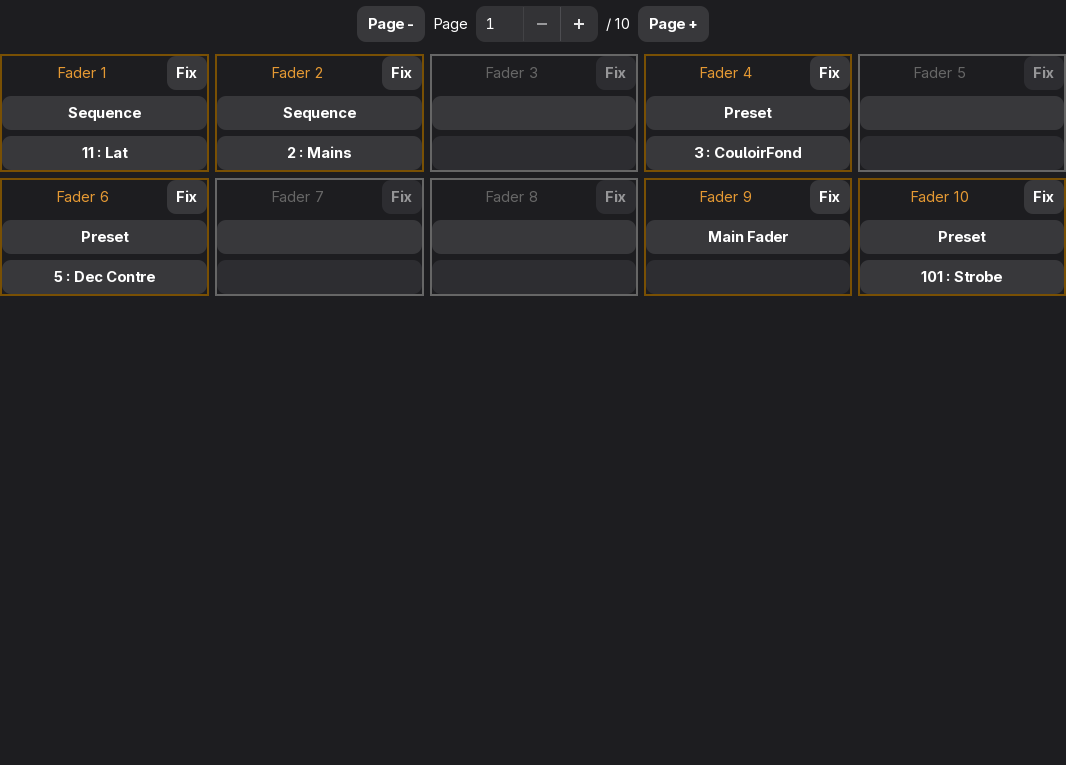
Multi-Page Navigation
The top bar navigates between pages (page count and Skip empty fader pages behavior are configurable in Preferences → General):
Page -/Page +: step backward or forward one page.Page <n> / <total>spinbox: jump directly to any page number.
Fader Slot Configuration
Each slot presents:
Fader <N>header +Fixtoggle button: enablingFixpins that fader slot identically across all fader pages (ideal for keepingMain Fader, key washes, or global effects permanently on hand).- Type Selector:
- (empty): unassigned slot.
Preset: plays back a storedPreset(HTP intensity + attributes).Sequence: assigns an auxiliary cue sequence (e.g.2 : Mains,11 : Lat).Effect: drives a parametric effect live withMode: Size,Mode: Rate, orMode: Size+Rateand channel scope controls.Main Fader: acts as grand master output dimmer.
- Content Selector: picks the target
Preset,Sequence, orEffect.
Previous: 12. Sequences, Tracking & MIB — Next: 14. Dimmer Curves (Curves) →