| Français | ← Table of Contents |
14. Dimmer Curves (Curves)
The Curves tab lets you inspect and build custom response curves mapping logical channel levels to physical DMX output (0..255), assignable in the Patch tab:
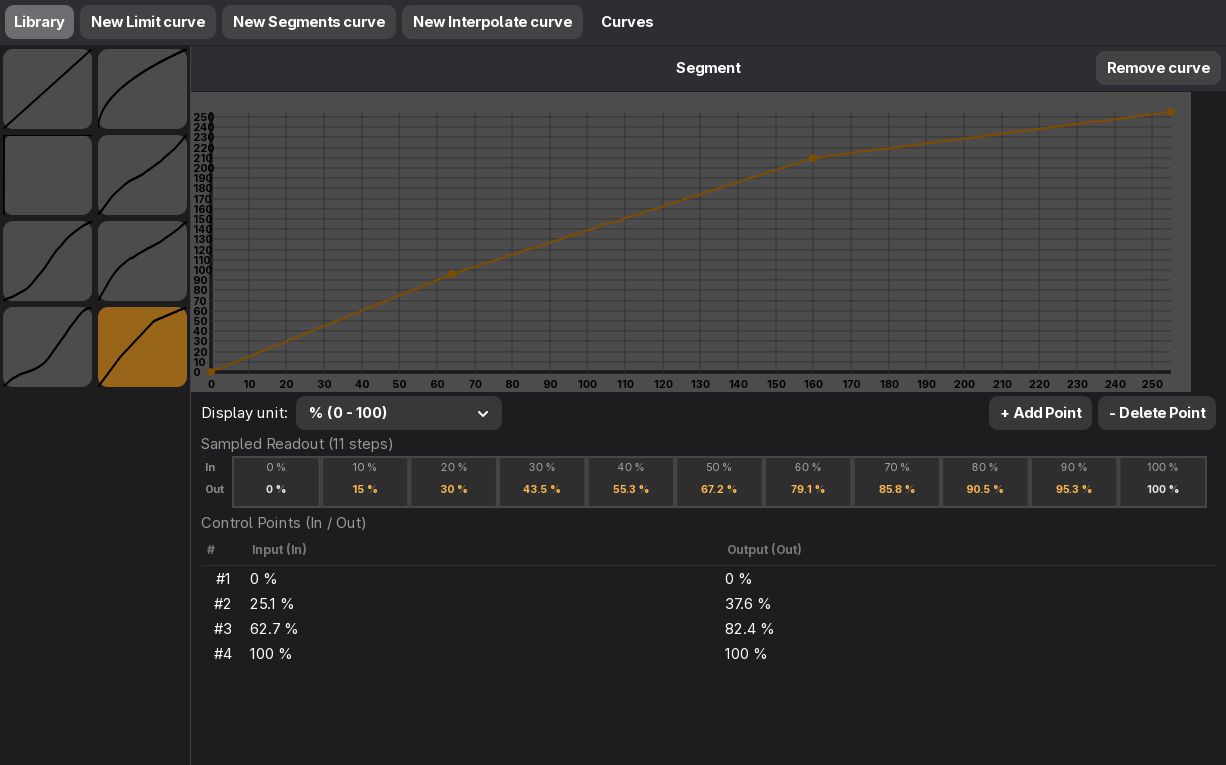
Top Bar & Collapsible Library
Library: toggles the left thumbnail sidebar so you can maximize canvas width during editing.New Limit curve: creates a ceiling/limiting dimmer curve.New Segments curve: creates a piecewise-linear curve joined by draggable breakpoints.New Interpolate curve: creates a smoothly interpolated curve through control points.Remove curve: deletes the active custom curve.
Interactive Graph & Readout Controls
- Interactive canvas (
0..255input/output axes): drag points directly with the pointer (pressDeleteto remove a selected point). Display unit: switches numerical readouts between% (0 - 100)andDMX (0 - 255).+ Add Point/- Delete Point: adds or deletes control points precisely.Sampled Readout (11 steps): displays output values at every10 %step (0 %through100 %).Control Points (In / Out): editable table listing every exact(In, Out)breakpoint (#1,#2, …).
Previous: 13. Multi-Page Faders — Next: 15. Track Channels →