| Français | ← Table of Contents |
15. Track Channels
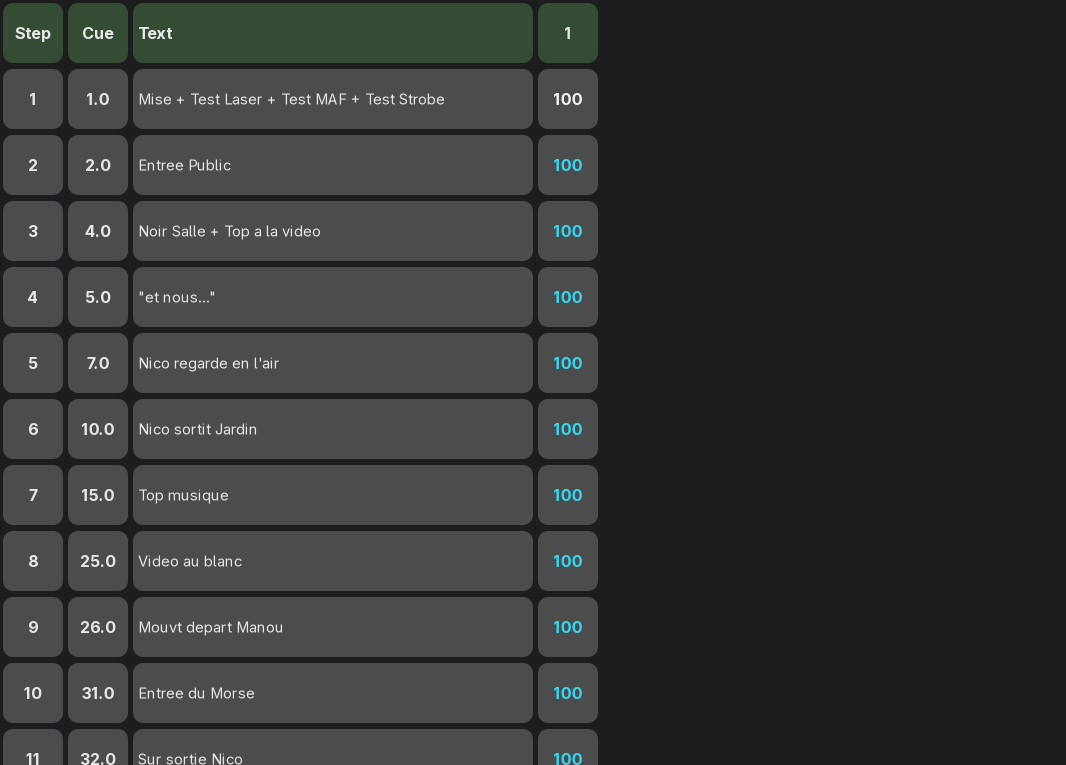
The Track Channels tab (Shift+Ctrl+T) shows a step-by-step cue history spreadsheet for one or more selected channels across Main Playback:
Usage
- Select one or more patched channels in
Channels(or via CLI, e.g.1 THRU 4). - Open
Track Channels(Shift+Ctrl+T). - Rows correspond to sequence steps (
Step,Cue,Text) and each additional column tracks one selected channel.
State Readouts
Levels are rendered using console tracking colors (fade up, fade down, tracked/held, blocked) formatted in percent or raw DMX depending on your Percentage preference—ideal during technical rehearsals to audit where any fixture turns on, blocks, or fades out.
Previous: 14. Dimmer Curves (Curves) — Next: 16. Independents →